Site health: uptime, SSL and speed
Add every site you look after, and watch uptime, SSL certificates, outages, deploys, PageSpeed, Core Web Vitals and broken links.
Site health watches every website you look after, whatever it runs on (WordPress, Vercel, Railway or anything else): is it up, is its SSL certificate valid, is it fast, and is it secure.
The Sites page
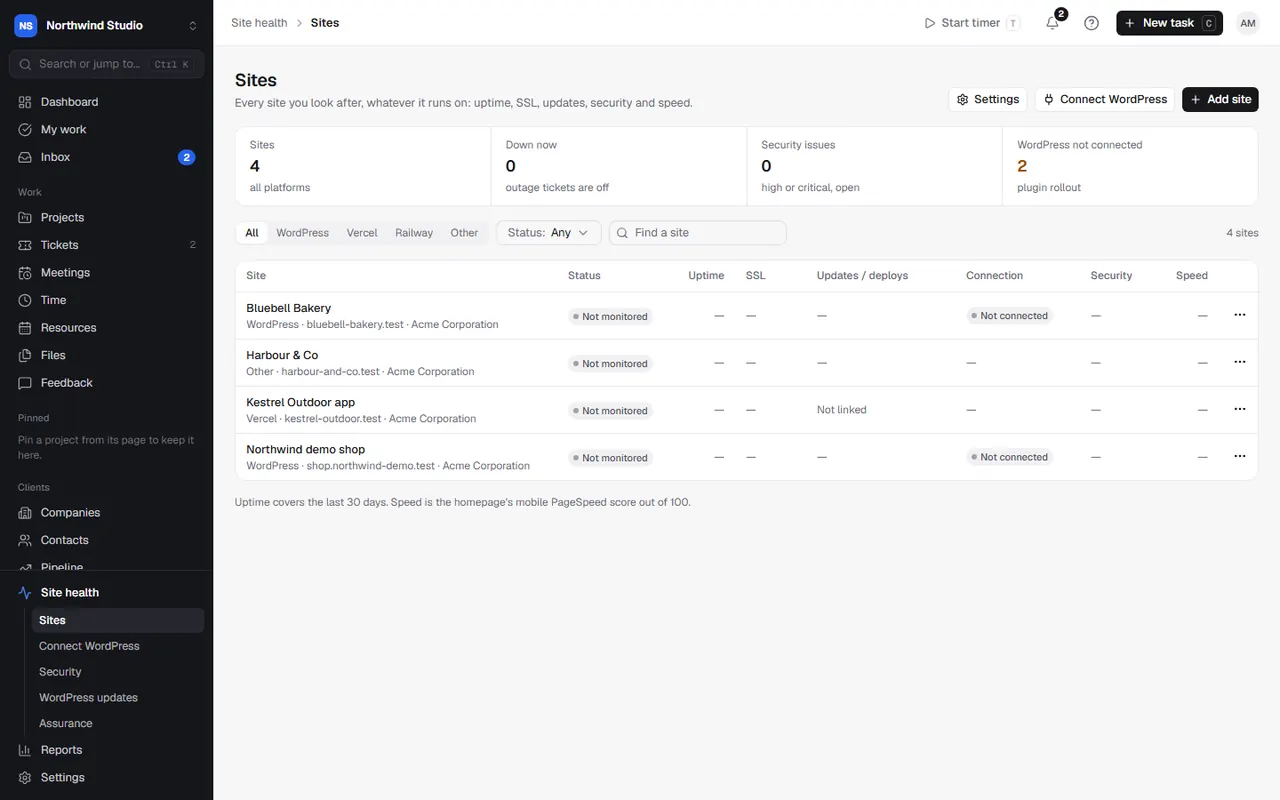
Site health opens on Sites, with counts of sites, sites down now, security issues and WordPress sites not connected. Each row shows the site's status, uptime over the last 30 days, days until its SSL certificate expires, its latest updates or deploys, its WordPress connection, security issues, and speed (the homepage's mobile PageSpeed score out of 100). Filter by platform and status.
Add a site
Choose Add site (or Connect WordPress for WordPress sites, see installing the connector):
- The site: name, address (the homepage), what it runs on, the client (outage tickets open for them), the project, and the client's hosting service.
- Uptime monitoring: how often to check, and after how many failed checks in a row to alert and open a ticket. Turn it off for sites you don't want monitored.
- PageSpeed: the homepage is always checked on mobile and desktop; add up to four more key pages. Turn it off for no PageSpeed or broken-link checks.
Every site gets uptime and SSL monitoring straight away.
A site's page
Open a site to see three tabs:
- Overview: status, uptime, response time, SSL certificate, outages, and (for WordPress) the plugin, last check-in, versions, updates waiting, PHP errors, the last update run and the staging copy. Vercel and Railway sites show their latest deployment. Check now runs the checks straight away.
- Performance: PageSpeed scores for each page on mobile and desktop (LCP, CLS, TBT), Core Web Vitals from real Chrome users, and broken links (each week, up to 50 of the homepage's own links are checked).
- Updates: WordPress updates, or deploys for Vercel and Railway sites.
When a site goes down
Owners and admins are always alerted. In Settings › Site health › When a site goes down you can also have OpsDash open a ticket (off until you switch it on): one ticket per outage for the site's client, assigned to their default person or team, with a priority you choose.
Clients are never told automatically. Use Notify client on the ticket or the site to send them a ready-made message you can edit.
PageSpeed
Scheduled PageSpeed and broken-link checks are off until you switch them on in Settings › Site health › PageSpeed. Choose how often each page is checked; checks run a few each hour, homepages first. Without a Google API key, checks use Google's small shared allowance; add your own key for reliable checks. See Wordfence and PageSpeed keys. You can always run a check on one site with Run now.
Vercel and Railway deploys
Link a Vercel or Railway site to its project to see deploys on the site's page. Add the tokens in Site health settings: see Vercel and Railway.
Monthly reports
Uptime, updates, backups, security fixes and PageSpeed can go into each client's monthly report.
Settings in OpsDash
These open in OpsDash. You’ll be asked to sign in first if you aren’t already.
Related articles
- Security and vulnerability alertsSee known vulnerabilities in the plugins, themes and WordPress versions on your connected sites, and get alerts for new ones.
- WordPress updatesUpdate plugins, themes and WordPress safely, one at a time with a backup, automatically in a maintenance window or by hand, with staging, visual checks and failure tickets.
- Wordfence, PageSpeed and ScreenshotOne keysAdd the keys Site health uses for vulnerability alerts, PageSpeed checks and before-and-after screenshots of WordPress updates.