Boards, lists and other project views
Work in a board or a list, group and filter tasks, save views, and use the timeline, workload, files and financials.
Every project has several views of the same tasks. Pick one from the tabs at the top of the project.
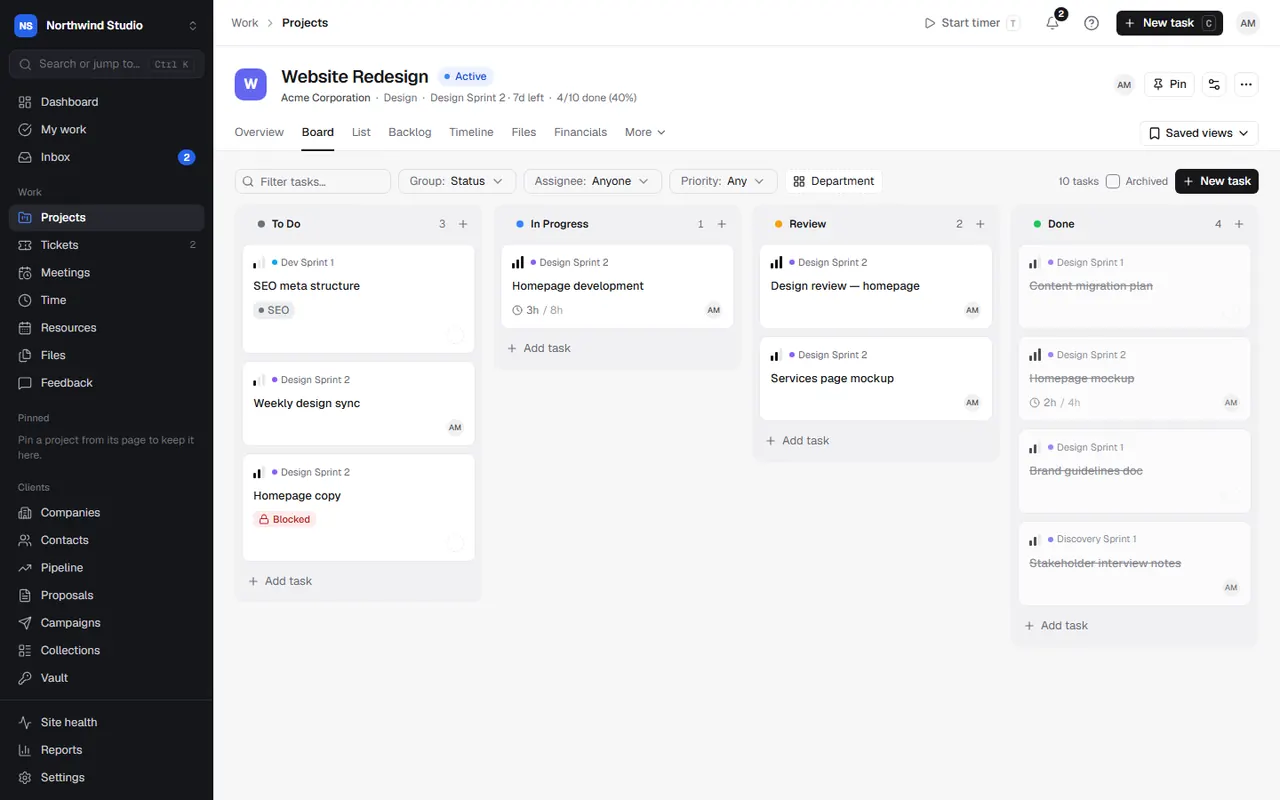
Board
A column for each task status. Drag cards between columns to change their status, and drag columns to reorder them. Group the board by Status, Phase, Department or Sprint, and filter by Assignee or Priority, or type to filter by title. New task adds a card.
List
A table of tasks, with inline editing: change the status, assignee or priority straight from the row, and tick the box to mark a task done. Group by Status, Assignee, Priority, Sprint, Phase or Department. Filter by assignee, priority, and Open only or All tasks. Drag rows to reorder them.
Subtasks show under their parent. When you filter by a person, a parent task shows (greyed) if one of its subtasks matches.
Tasks waiting on content from the client show that they're on hold.
Saved views
On the Board, List, Timeline and Workload, the Saved views menu keeps your grouping and filters. Save current view, give it a name, and tick Share with team if others should see it. Rename or delete views under Manage views.
Timeline
For projects with phases or sprints: phases, sprints, tasks and milestones laid out on a calendar. Zoom in or out, turn on department swimlanes, and drag the ends of a task's bar to change its start or due date.
Workload
How much work each person has on this project against their capacity, for this week, the next two weeks, this month or dates you choose. People over 80% show amber, over 100% red. For workload across all projects, see schedule and capacity.
Files
Every file attached to the project's tasks and comments, in one place. See files.
Financials
What's been invoiced and paid, expenses, and uninvoiced time for the project, with its invoices and expenses listed. Choose New Invoice or Add Expense from here. Profitability needs the right permission.
Content and Feedback
Under More: Content lists the collections of content you're gathering from the client for this project, and Feedback shows website feedback on the project's site.
Related articles
- ProjectsCreate a project, choose how it's organised, and use its overview, settings, status updates and templates.
- Phases, sprints and milestonesSplit a project into phases, run work in sprints from a backlog, and mark key deliverables as milestones.
- The task panelCreate tasks, and set their status, people, dates, estimates, phase, sprint, tags, custom fields and recurrence from the task panel.