Deals and the pipeline
Track sales from enquiry to won, chase next steps, spot opportunities with existing clients, and let a won deal set up the work.
A deal is a piece of work you hope to win. Deals move through the stages of your pipeline (for example Enquiry, Proposal sent, Negotiating), and end as won or lost.
Add a deal
Choose New deal on the Pipeline page. Give it a title, the company and contact, the value, and:
- One-off value (a build or project) and/or a monthly value (ongoing work like hosting, SEO or maintenance), with when the recurring part starts.
- Service lines: what it's for (website build, SEO, hosting…). Set yours up in Settings › Pipeline.
- Lead source and referred by, the expected close date, probability, estimated hours and priority.
A sales enquiry that arrived as a ticket can become a deal from the ticket: choose Make a deal. The deal gets the ticket's client, contact and message, and a next step to reply today.
The pipeline views
The Pipeline page has six views along the top:
- Board: a column per stage. Drag deals between stages. Each column shows its total, and the totals at the top split one-off, monthly and the weighted forecast.
- List: a table you can filter, sort and save as your own views (only you see your views).
- To chase: open deals whose next step is due today or late, or that have no next step. Set the next step (what happens next and when) right there.
- Opportunities: suggestions for selling more to clients you already have: renewals in the next 60 days, projects that finished 2–6 months ago, and clients with no hosting, maintenance or SEO. Make a deal from a suggestion, and it's hidden while the deal is open and for six months after.
- Forecast: what the open pipeline should bring in each month, weighted by each deal's probability, over 6 or 12 months. Download it as CSV.
- Reports: deals by source, service line and owner, with win rate, value won and average days to close.
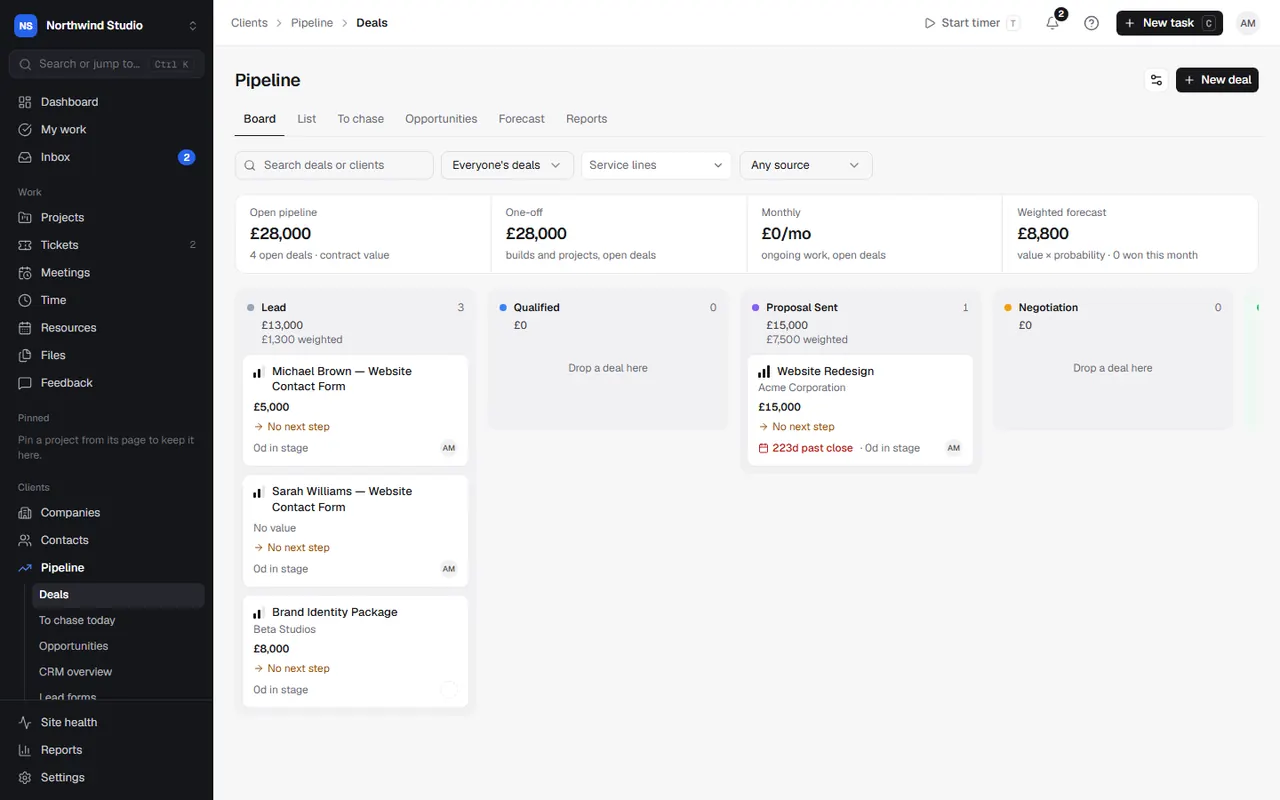
Filter any view by owner, service line, lead source or by searching.
Next steps
Every open deal should have a next step: a short note ("Call to go through the proposal") and a date. Quick dates (Today, Tomorrow, In 3 days, Next week) make it fast. Deals without one appear in To chase.
Quotes and proposals from a deal
On a deal, choose Quote or proposal: a quote suits smaller jobs, a proposal suits projects. Either is filled in from the deal. When the client accepts it, the deal can be won automatically. See quotes and proposals and contracts.
Winning a deal: the When won playbook
When a deal is won, OpsDash can set up the work for you. The When won checklist on the deal lists the steps, each ticked or not:
- a project from a template (the deal's estimated hours become its hours budget),
- a renewal plan for the recurring part, to bundle hosting and services,
- a draft agreement (retainer, SEO, maintenance or plan) for the recurring part,
- a payment schedule on the one-off amount, with the deposit drafted as an invoice (a percentage or a fixed amount, and optionally a balance stage for the rest),
- kickoff tasks on the new project,
- confirming pencilled-in bookings on the team schedule,
- enrolling the client in an onboarding sequence (welcome email, portal invite, content collection, kickoff call),
- a notification saying what was won and what was set up.
Choose Won and run the ticked steps, or Just mark won and come back to the checklist later. Set the default playbook (and one per service line) in Settings › Pipeline › When won playbook. There you also choose whether it runs straight away when a client accepts a quote or proposal, or waits for someone to check.
Losing a deal
Choose Mark lost and give a reason (optional, but it feeds the reports). Losing a deal removes any pencilled-in bookings.
Stages and automations
Add, rename and reorder stages, and set each stage's probability, in Settings › Pipeline. Deal automations can act when a deal goes quiet or changes stage.
Settings in OpsDash
These open in OpsDash. You’ll be asked to sign in first if you aren’t already.
Related articles
- Proposals and contractsBuild proposals from blocks, send them for acceptance, and send contracts for e-signature with an audit trail.
- QuotesPrice smaller jobs with a quote, send it for acceptance, and turn an accepted quote into an invoice or a project.
- ProjectsCreate a project, choose how it's organised, and use its overview, settings, status updates and templates.