How settings work
Find any setting quickly, see who can change what, and where each group of settings is explained.
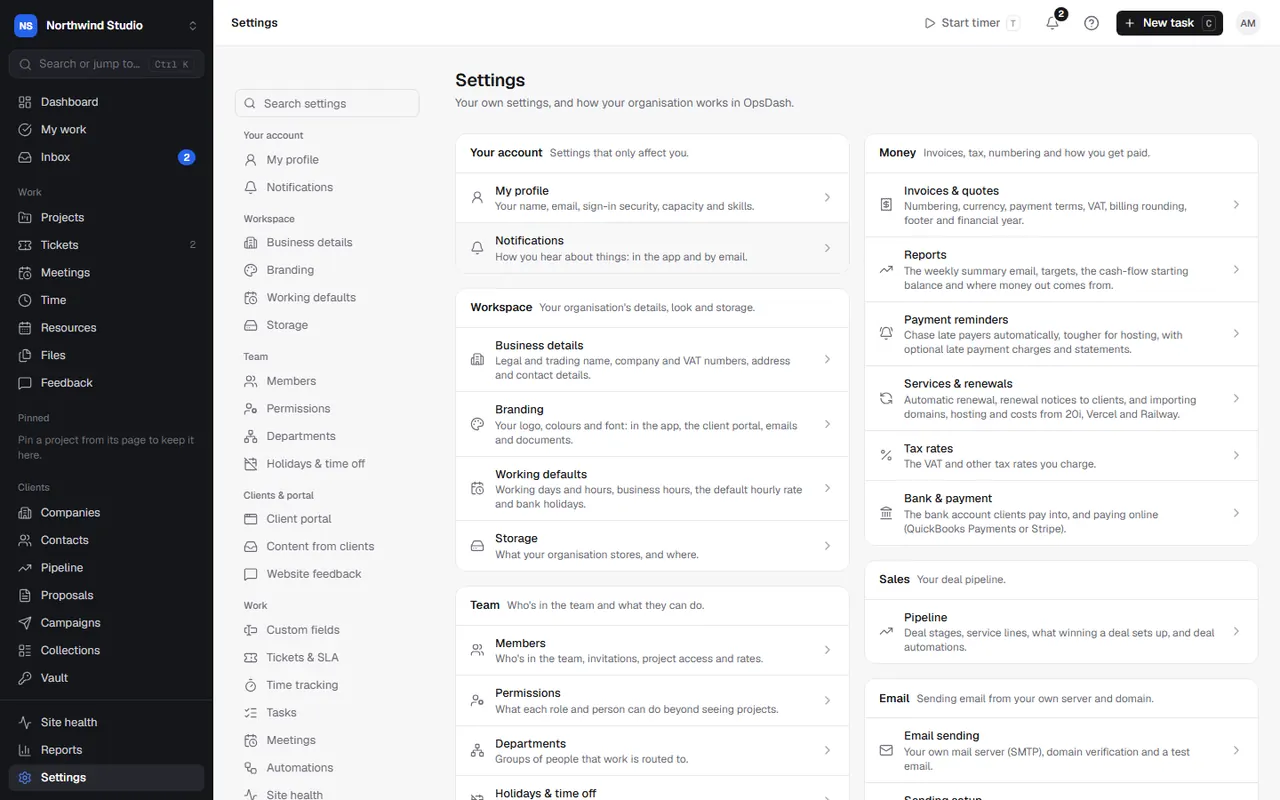
Settings is at the bottom of the sidebar (or in your account menu). Its overview lists every settings page, grouped:
| Group | What's in it |
|---|---|
| Your account | Your profile, sign-in security, calendars and notifications. |
| Workspace | Business details, branding, working defaults and storage. |
| Team | Members, permissions, departments, holidays and time off. |
| Clients & portal | The client portal, content from clients, website feedback. |
| Work | Custom fields, tickets, time tracking, tasks, meetings, automations and site health. |
| Money | Invoices and quotes, reports, payment reminders, services, tax rates, bank and payment. |
| Sales | Your deal pipeline. |
| Sending from your own server and domain. | |
| Integrations | QuickBooks, Google, GitHub, Figma, monday.com and email marketing tools. |
| AI & agents | AI drafting, connected agents and the support mailbox. |
| Security | Two-factor sign-in for your team and clients, and the audit log. |
Finding a setting
Type in the search box at the top of the settings menu, or press Ctrl+K (⌘K) anywhere and type what you're after ("VAT", "two-factor", "late fees"). Search finds pages and the sections within them, and jumps straight to the right place.
On a phone or narrow window, the settings menu is a drop-down above the page.
Who can change what
Everyone can open every settings page:
- Your account pages are your own, so you can always change them.
- Most other pages can only be changed by owners and admins.
- Some can also be changed by people with a particular permission (custom fields, departments, tickets and SLA, the pipeline, QuickBooks and monday.com).
If you can't change a page, you see it read-only with a note saying why, and the menu shows a lock beside it.
Help for each page
Every settings page has a Help link to its article in this help centre.
Settings in OpsDash
These open in OpsDash. You’ll be asked to sign in first if you aren’t already.
Related articles
- Your account settingsMy profile (name, email, two-factor, passkeys, resource profile, Google and calendars) and your notification preferences.
- Workspace settingsBusiness details, branding (app, portal and emails), working defaults and business hours, and storage.
- Project access and permissionsChoose which projects people can see, and what each role and person can do beyond that: finances, the vault, WordPress logins, campaigns and settings.